Amazon Infographic Images with AI: Proof-Aware 2026 Guide
Amazon infographic images work when they are readable and proof-backed. Here is how to create them with AI without inventing claims.
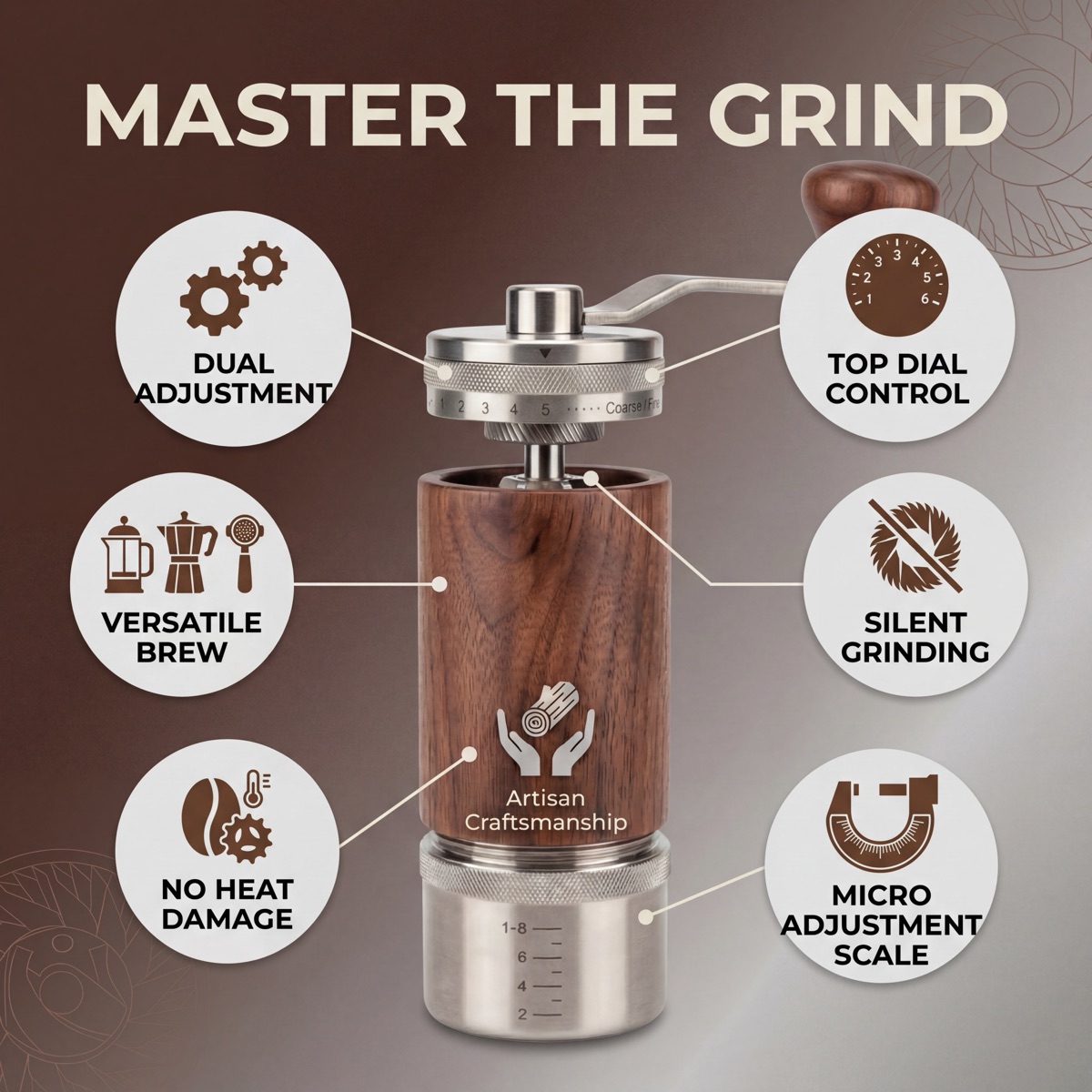
What Are Amazon Infographic Images?
Amazon infographic images are product photos enhanced with text overlays, icons, and visual callouts that highlight key features, specs, and benefits. They belong in secondary gallery positions on your Amazon listing, where the rules are far more flexible than the main image.
Instead of showing your product from another angle, an infographic tells the shopper what matters. It labels the stainless steel blade, points to the ergonomic grip, and calls out the 12-month warranty. All in a single glance.
Why they matter
Most Amazon shoppers scan images before they read the bullet points. Infographic images can answer practical questions quickly when their callouts are accurate, readable, and tied to product proof.
Think of them as a visual planning layer, not a place to invent extra claims. Every callout should come from product data, a label, packaging, a certificate/CoA, or approved seller copy.
Why Infographic Images Need Proof Review
Infographics are one of the easiest places for claim drift to happen because image text is short and persuasive. A proof-aware workflow keeps source material visible before export.
The proof behind infographics
- Benefit callouts should come from approved claims.
- Ingredient or spec callouts should match the label or product data.
- Trust callouts should have a source such as packaging, certificate, or CoA.
- Missing proof should create a review warning before export.
Why visuals need source material
Amazon shoppers are scanners. They flip through your images in 5 to 10 seconds. Most never open the description tab. The bullet points get skimmed at best.
An infographic puts your strongest selling points directly in front of the shopper, in the exact place they're already looking. No extra clicks, no scrolling, no reading walls of text.
When a shopper can see "BPA-Free, Dishwasher Safe, Holds 32oz" at a glance, they trust the product more. When those details are buried in paragraph three of your description, they never see them.
What Makes a Good Amazon Infographic
Not all infographic images convert equally. The best ones follow a few consistent principles.
Keep it readable at thumbnail size
Your infographic needs to work at 150 x 150 pixels. That is the size shoppers see on mobile search results. If the text is unreadable at thumbnail size, the infographic adds nothing.
Use large, bold fonts. Stick to high-contrast color combinations. Test by shrinking the image to thumbnail size before uploading.
Limit callouts to 4-6 per image
More is not better. A cluttered infographic with 10 feature callouts looks overwhelming and confusing. Pick the 4 to 6 features that matter most for the buying decision.
If you have more features to highlight, spread them across two separate infographic images instead of cramming everything into one.
Lead with benefits, not raw specs
"4000mAh Battery" means nothing to most shoppers. "Lasts 14 Hours on a Single Charge" means everything. Always translate specs into outcomes the shopper actually cares about.
Pair the benefit with the spec when possible. "14-Hour Battery Life (4000mAh)" gives both the emotional hook and the technical detail.
Stay consistent with your brand
Use the same 2-3 colors across all your infographic images. Match the font style across your listing. This creates a professional, cohesive look that builds trust.
Random colors and different fonts on every image make your listing look thrown together. Consistency signals quality.
Types of Amazon Infographic Images
There are several proven infographic formats. The best listings use a mix of these across their secondary image slots.
Feature callout
The most common type. Your product photo in the center with lines or arrows pointing to key features. Each callout includes a short label and sometimes an icon. This is the workhorse of Amazon infographics.
Best for: Physical products with multiple visible features (electronics, kitchen tools, bags, furniture).
Comparison chart
A side-by-side visual comparing your product against a generic competitor. This format is extremely effective for showing why your product is the better choice.
Best for: Products in competitive categories where differentiation matters (supplements, phone cases, kitchen gadgets).
Ingredient or material breakdown
Shows what your product is made of with close-up callouts. Think "100% Organic Cotton," "Medical-Grade Silicone," or "No Artificial Preservatives." This format builds trust for health, wellness, and premium products.
Best for: Skincare, food products, supplements, clothing, baby products.
Size and dimension comparison
Places your product next to everyday objects for scale reference, with exact measurements overlaid. This dramatically reduces returns caused by size surprises.
Best for: Furniture, storage containers, bags, electronics, any product where size is a common question.
How-to-use
A step-by-step visual showing the product in action. Usually 3 to 4 numbered steps with brief captions. This works well for products that aren't immediately obvious in their usage.
Best for: Tools, beauty devices, fitness equipment, assembly-required products.
What's in the box
A flat-lay image showing every item included in the package, each one labeled. This prevents "I thought it came with batteries" reviews and sets clear expectations.
Best for: Kits, bundles, electronics with accessories, gift sets.
How to Create Amazon Infographics with AI
Creating professional infographic images used to require a graphic designer or hours in Canva. AI tools have changed that completely.
Here is how to create Amazon infographic images using ProdVue in a few minutes.
Step 1: Upload your product photo
Start with a clean product photo on a white or neutral background. The AI needs a clear view of your product to generate accurate callouts. A smartphone photo works fine as long as the product is well-lit and in focus.
Step 2: Select the infographic type
Choose from feature callout, comparison, ingredient breakdown, size reference, how-to-use, or what's-in-the-box. Each type follows a proven layout template optimized for Amazon's image dimensions.
Step 3: Add your product details
Enter the key features, specs, and benefits you want highlighted. The AI analyzes your product photo and matches your input to the right visual layout. It positions callouts where they make sense based on the product's shape and features.
Step 4: Review and refine
The AI generates a complete infographic at 4K resolution (4096 x 4096 pixels). Review the result, adjust any callout text, and regenerate if needed. Most sellers get a usable result on the first or second try.
Step 5: Download and upload to Amazon
Download the final image and upload it to your Amazon listing in Seller Central. Place infographics after the main image, where they can answer shopper questions without interfering with main-image rules.
The process can take minutes per image. Compare that to 2-4 hours with a design tool or several business days waiting on a freelance designer.
Try the Amazon infographic image generator, explore product infographic design, or see pricing plans.
Amazon Infographic Image Requirements
Amazon allows much more creative freedom on secondary images compared to the main image. But there are still rules to follow.
Technical requirements
| Requirement | Specification | |-------------|---------------| | Minimum resolution | 1000px on the longest side | | Recommended resolution | 2000px+ (enables zoom) | | Maximum resolution | 10,000px on the longest side | | File format | JPEG, PNG, TIFF, or GIF (non-animated) | | Color profile | sRGB or CMYK | | Aspect ratio | 1:1 recommended for consistent display |
Content rules
- No offensive, violent, or inappropriate content
- All claims must be accurate and verifiable. Do not add "FDA Approved" unless your product actually has FDA approval
- No contact information, URLs, or external references
- Amazon's logo and branding cannot appear in your images
- Pricing and promotional language ("Sale," "Best Deal") are not allowed
Breaking these rules can result in image rejection or listing suppression. For the full breakdown of every Amazon image requirement, read our Amazon product image requirements guide.
Common Mistakes to Avoid
Even sellers who invest in infographic images often make errors that reduce their effectiveness.
Too much text
If your infographic looks like a Wikipedia page, it is doing more harm than good. Shoppers won't read 8 lines of text on an image. Keep each callout to 5 to 8 words maximum.
Wrong callouts
Highlighting features that don't influence the buying decision wastes valuable image space. "Available in Blue" is not a callout. "Blocks 99.9% of UV Rays" is. Every callout should answer the question: "Would this make someone click Add to Cart?"
Unreadable at small sizes
Test every infographic at mobile thumbnail size. If you have to squint to read it, the shopper will just skip it. Use a minimum font size of 24pt for callout text, and avoid thin fonts that disappear at low resolution.
Inconsistent brand style
Switching between different color schemes, fonts, and layout styles across your image stack makes your listing look unprofessional. Pick a style and stick with it across the secondary gallery.
Making unverifiable claims
Never add health claims, performance stats, or certifications that you cannot back up. Amazon actively monitors for misleading claims, and customers will report inaccuracies. Stick to facts you can prove.
How Much Do Amazon Infographics Cost?
The cost depends entirely on how you create them. Here's a realistic comparison.
Graphic designer (freelance)
Cost: €50 to €150 per image. A skilled freelancer on Fiverr or Upwork will create custom infographics based on your specs. Quality varies widely. Turnaround is typically 3 to 7 business days per revision cycle.
For a full set of 5 infographic images, expect to pay €250 to €750. If you need revisions, add another round of waiting and potentially extra charges.
Canva or Photoshop (DIY)
Cost: €0 to €15/month for the tool. Free in terms of software, but expensive in time. Expect 1 to 3 hours per infographic image if you're not a designer. The results often look templated because thousands of other sellers use the same Canva layouts.
DIY infographics work in a pinch, but they often look templated and can become hard to read on mobile.
AI tool like ProdVue
Cost: from €39/month (2 products, included revisions). Upload your product photo, select the infographic type, and get a finished image in minutes. The AI handles layout, positioning, and design. No design skills needed.
For most sellers, this is the sweet spot between cost and quality. You get professional results at a fraction of the designer price, with turnaround measured in minutes instead of days.
See ProdVue pricing plans to find the right fit for your catalog size.
Full comparison
| Method | Cost per Image | Time per Image | Design Skill Needed | Quality | |--------|---------------|----------------|---------------------|---------| | Freelance designer | €50-150 | 3-7 days | None (you brief them) | High (varies) | | Canva / DIY | €0-3 | 1-3 hours | Moderate | Medium | | AI tool (ProdVue) | From about €16.60/product on monthly plans | Minutes + review | None | High |
For a deeper breakdown of all product photography costs, read our photography cost breakdown.
Start Creating Amazon Infographics Today
Infographic images are one of the clearest ways to answer buyer questions in the Amazon gallery. They work best when the callouts are short, readable, and backed by product facts.
The fastest way to get started is to upload a product photo, add product details, generate a first version, and review every callout before export.
Create your first Amazon infographic with ProdVue, then review claims with the Review Workflow.